Supported Personal Weather Stations
Weatherstage works with most personal weather stations that can send data over the internet. This page lists compatible models and how to connect them.
✅ = Supports custom server URL (easy setup)
⚠️ = Requires DNS redirect (advanced setup)
Manufacturers
- Ecowitt
- Ambient Weather
- Froggit
- Sainlogic
- Eurochron
- Davis Instruments
- Bresser
- Vevor
- Home Assistant
- EasyWeatherPro Software
Ecowitt
Ecowitt stations have excellent custom server support through the WS View app. You can enter any server URL directly in the settings.
| Model | Compatibility | Notes |
|---|---|---|
| Ecowitt GW1000 | ✅ | WiFi gateway for Ecowitt sensors |
| Ecowitt GW1100 | ✅ | WiFi gateway with built-in sensors |
| Ecowitt GW1200 | ✅ | WiFi gateway |
| Ecowitt GW2000 | ✅ | WiFi gateway with Ethernet |
| Ecowitt HP2551 | ✅ | Console with WiFi |
| Ecowitt HP2553 | ✅ | Console with WiFi |
| Ecowitt HP3500 | ✅ | 7" TFT display console |
| Ecowitt WS2320 | ✅ | WiFi weather station |
| Ecowitt WS2350 | ✅ | WiFi weather station |
| Ecowitt WS2900 | ✅ | WiFi weather station with solar panel |
| Ecowitt WS3800 | ✅ | WiFi weather station |
| Ecowitt WS3900 | ✅ | WiFi weather station |
| Ecowitt WN1980 | ✅ | WiFi weather station |
| Ecowitt WN1900 | ✅ | WiFi weather station |
| Ecowitt WN1910 | ✅ | WiFi weather station |
Ambient Weather
Ambient Weather stations support custom server URLs through the awnet app under "Customized" settings.
| Model | Compatibility | Notes |
|---|---|---|
| Ambient Weather WS-2000 | ✅ | WiFi weather station |
| Ambient Weather WS-2902A | ✅ | WiFi weather station |
| Ambient Weather WS-2902B | ✅ | WiFi weather station |
| Ambient Weather WS-2902C | ✅ | WiFi weather station |
| Ambient Weather WS-2902D | ✅ | WiFi weather station |
| Ambient Weather WS-5000 | ✅ | Professional weather station |
Froggit
Froggit stations use Ecowitt firmware and support custom server URLs through the WS View app.
| Model | Compatibility | Notes |
|---|---|---|
| Froggit WH3000 | ✅ | WiFi weather station |
| Froggit WH3000SE | ✅ | WiFi weather station |
| Froggit WH3000SE Pro | ✅ | WiFi weather station |
| Froggit WH4000SE | ✅ | WiFi weather station |
| Froggit DP1500 | ✅ | WiFi gateway dongle |
| Froggit HP1000SE | ✅ | WiFi console |
| Froggit HP1000SE Pro | ✅ | WiFi console |
Sainlogic
Sainlogic stations use EasyWeatherPro software and support custom server URLs. Configure via the WS View app or web interface.
| Model | Compatibility | Notes |
|---|---|---|
| Sainlogic WS3500 | ✅ | Professional WiFi weather station |
| Sainlogic WS0835 | ✅ | Professional WiFi weather station |
| Sainlogic WS0835 Plus | ✅ | Professional WiFi weather station |
| Sainlogic WS0310 | ✅ | 10" display WiFi weather station |
Eurochron
Eurochron stations use EasyWeatherPro software. Custom server support requires firmware v1.5.3 or later.
| Model | Compatibility | Notes |
|---|---|---|
| Eurochron EFWS 2900 | ✅ | WiFi weather station |
Davis Instruments
Davis stations require the WeatherLink system. Data can be sent to Weatherstage using a custom script or Home Assistant integration.
| Model | Compatibility | Notes |
|---|---|---|
| Davis Vantage Vue | ⚠️ | Requires WeatherLink + script |
| Davis Vantage Pro2 | ⚠️ | Requires WeatherLink + script |
| Davis Vantage Pro2 Plus | ⚠️ | Requires WeatherLink + script |
Bresser
Bresser stations only support Weather Underground, Weathercloud, and AWEKAS. A DNS redirect is required to send data to Weatherstage.
| Model | Compatibility | Notes |
|---|---|---|
| Bresser 5-in-1 WiFi | ⚠️ | DNS redirect required |
| Bresser 6-in-1 WiFi | ⚠️ | DNS redirect required |
| Bresser 7-in-1 WiFi | ⚠️ | DNS redirect required |
| Bresser ClearView | ⚠️ | DNS redirect required |
Vevor
Vevor stations only support Weather Underground and Weathercloud. A DNS redirect is required to send data to Weatherstage.
| Model | Compatibility | Notes |
|---|---|---|
| Vevor 7-in-1 WiFi (YT60234) | ⚠️ | DNS redirect required |
Home Assistant
If you use Home Assistant, you can send weather data from any connected sensor to Weatherstage using our REST API integration.
| Integration | Compatibility | Notes |
|---|---|---|
| Home Assistant | ✅ | Use REST API to send data |
EasyWeatherPro Software
Many weather stations from different manufacturers use the EasyWeatherPro firmware (e.g., version V5.1.6). If your station runs this software, it supports custom server URLs regardless of the brand name.
Setup Instructions
You can configure your station via the WS View app (iOS/Android) or the web interface at the station's local IP address. Here's how:
- Open the weather services settings and find the Customized section
- Set Customized to Enable
- Set Protocol Type Same As to Ecowitt
- Enter the following settings:
- Server IP / Hostname:
weatherstage.com - Path:
/ingest/YOUR_INGEST_ID(find your ingest ID on the settings page) - Port:
80 - Upload Interval:
60seconds (or your preferred interval)
- Server IP / Hostname:
- Click Save
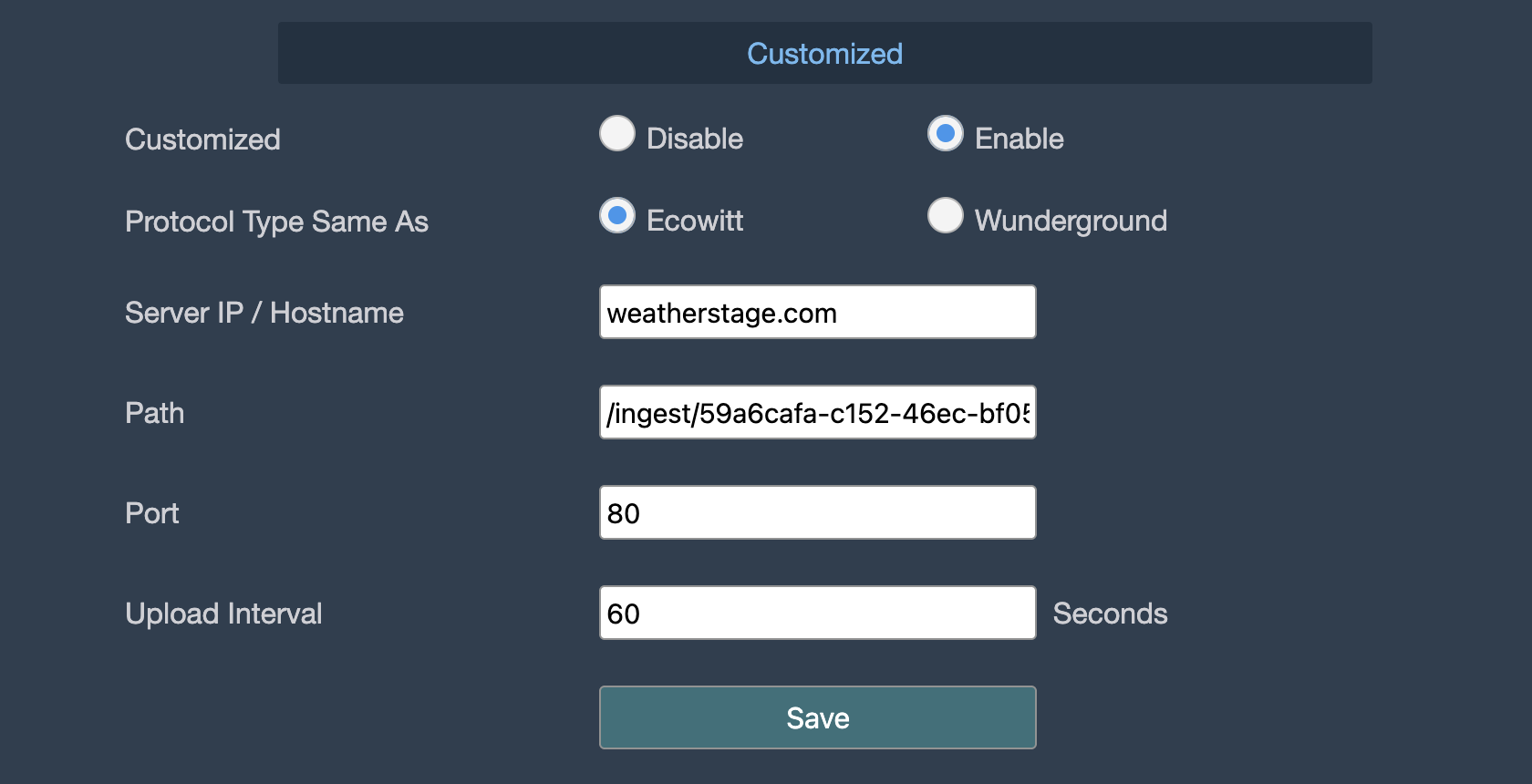
Your station will start sending data to Weatherstage within the configured interval.
Compatible Manufacturers
Known manufacturers using EasyWeatherPro:
- Ecowitt
- Froggit
- Sainlogic
- Eurochron
- Ambient Weather
- Fine Offset (and rebrands)
If your weather station uses EasyWeatherPro or WS View, it will likely work with Weatherstage even if not listed above.
DNS Redirect Setup
For stations marked with ⚠️, you need to redirect Weather Underground traffic to Weatherstage. Your weather station will think it's uploading to Weather Underground, but your DNS will send the data to our servers instead.
Step 1: Configure DNS Override
Redirect Weather Underground or Weathercloud traffic to Weatherstage's IP address. You can do this with:
- Pi-hole: Add a custom DNS record under Local DNS → DNS Records
- AdGuard Home: Add a DNS rewrite rule
- Router: Some routers support custom DNS entries
Example DNS entries (add one depending on your station):
rtupdate.wunderground.com → 152.53.169.42
weathercloud.net → 152.53.169.42
Note: If your router has DNS rebind protection enabled, you may need to allow this domain in your router settings for the override to work.
Step 2: Configure Your Weather Station
On your weather station, enable Weather Underground uploads. You can use any Station ID and Station Key - they don't need to be valid Weather Underground credentials since the data will be redirected to Weatherstage.
Step 3: Get Your Weatherstage Endpoint
After signing up, you'll receive a unique ingest URL. Contact us at [email protected] and we'll help you complete the DNS redirect setup for your station.
Need Help?
If your weather station isn't listed or you need help with setup, join our Discord community or email us at [email protected].